AUTOMATIC MACRO WORKFLOW: The Evolution of Editing in Premiere
Your time is precious. Stop wasting it on clicks. If you are a professional video editor, a YouTuber, or a content creator, you know this well. You spend hours of your day doing the exact same actions. Change the label color, select the clips, remove gaps, create a nest, move audio to track 3. It's mechanical, boring, and repetitive work. While you waste time on the timeline, deadlines approach relentlessly. Mental fatigue sets in and, worse, your true creativity is stifled by the frustration of a slow and cumbersome process. AM Workflow is here to break this chain. We have designed an extension capable of automating your daily processes, cutting out dead time and giving you back total control over your art.
What is AM Workflow?
AM Workflow is a revolutionary plug-in, developed exclusively for Adobe Premiere (fully supported in Beta versions as well). It works flawlessly, with the exact same top-tier performance, on both Mac and Windows ecosystems. The promise is simple but incredibly powerful: it allows you to create, save, and apply custom macros with a single click. A "macro" is a sequence of actions that you have pre-set. Instead of making five different clicks to organize a series of clips, you just need to press a single button on your new panel.
AM Workflow is not just a tool, it's your tool
The panel is fully customizable to adapt visually and functionally to your needs: You can upload custom images to use as backgrounds for individual macro buttons. Create a visual interface that speaks your language. The real revolution is the open ecosystem. All your macros can be easily exported and imported. Are you an expert editor who has created the ultimate workflow for vlogs or documentaries? You can create macro packages and sell them to other editors, turning your insights into a new and profitable revenue stream.
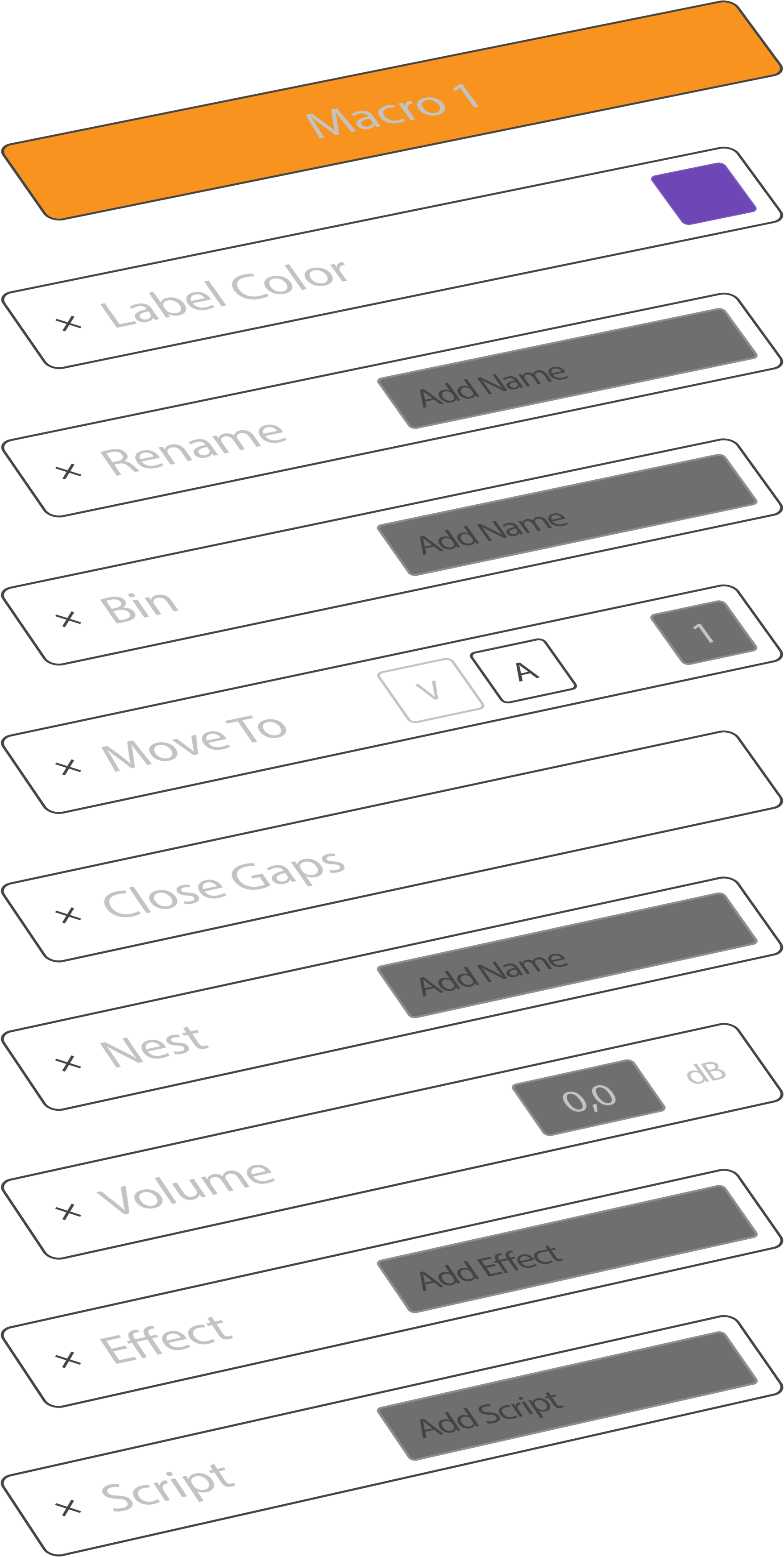
What can you actually automate? Here are the actions you can combine and launch in a millisecond:
Color Label: Instantly change the label color of all selected clips.
Check “Show Source Clip Name and Label” in the “Timeline Display Settings” to make it work.
Rename: Batch rename the selected clips to maintain strict and clean nomenclature.
Bin: This action automatically places the selected clips into a new dedicated bin in the Project panel.
Move To: Magically move the selected clips to a specific track
Close Gaps: Instantly compact your timeline by deleting all empty spaces between the selected clips.
Nest: Speed up complex processes by instantly creating a nested sequence with the highlighted elements.
Volume: Apply precise volume level adjustments to multiple clips simultaneously.
Effect: Instantly apply your favorite effect (pulled from Premiere's native Effects panel) to an entire selection.
Script: Execute a custom script written by you, opening the door to literally unlimited automation possibilities.
Our Vision (Version 1.0.0)
AM Workflow is not just a simple script thrown onto the web; it is a serious, ambitious, long-term project driven by a team of developers dedicated to changing the rules of video editing. To guarantee you this impressive speed, AM Workflow operates deep within the internal engine of Adobe Premiere Pro. Due to this deep architectural integration in this first version, some complex actions do not yet support the Undo command (Ctrl+Z / Cmd+Z). Our pro tip: When you are about to test a massive macro that acts on hundreds of clips, get into the habit of duplicating the sequence with one click. Work safely, experiment without limits, and enjoy the automation. This version in front of you is Version 1.0.0. It is just the first prototype but it is also our first solid step and represents the state of the art in current automation. It is only the beginning: those who embrace AM Workflow today join the revolution from day zero.
© 2026 AM Workflow. All rights reserved. The software, source code, and documentation are protected by international copyright laws.